What it does
Ask for a rig, edit it in 3D, take the renders and paperwork out. CADMVR does the first part of a lighting job and hands the file on to the tools that finish it.
Pre-release. In development for Windows 10 and 11; first alpha planned for 2027.
Three steps
- 01 · Ask
Ask for a rig
Describe the show in plain English. The assistant builds an initial rig in 3D.
Say what the show is, how wide the stage is and what you want on it. The assistant hangs truss, pulls real fixtures from the GDTF Share, focuses them and patches them, then tells you what it did. Everything it does is listed as a normal edit, and every one of them is undoable.
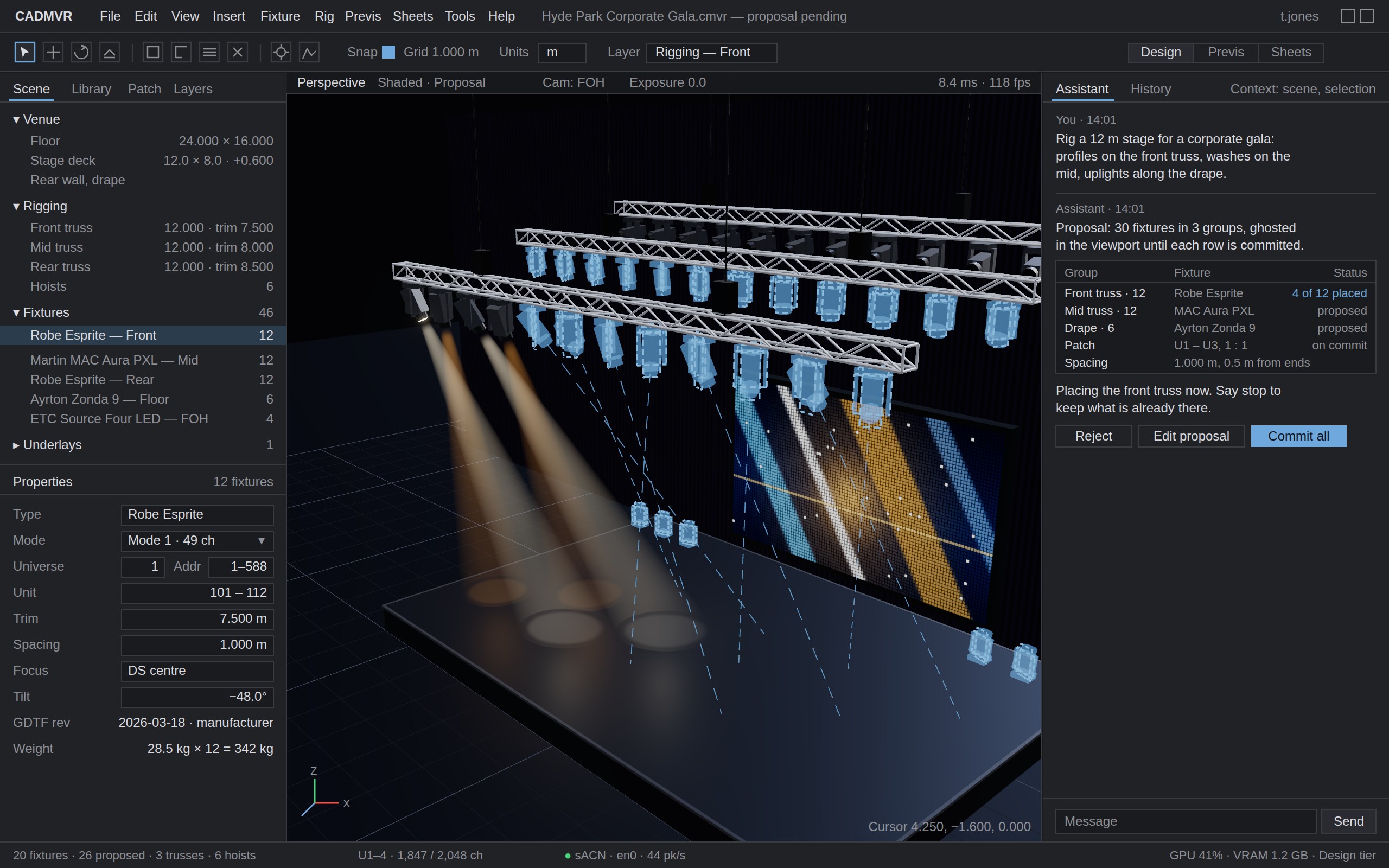
The assistant places fixtures along the front truss and lists each operation beside the viewport. - 02 · Edit
Move things yourself
A proper 3D workspace. The rig is yours to edit, not a chat transcript.
Drag fixtures along the truss, change trims, spacing and focus, swap a fixture type or add a position by hand. Properties are boxed numbers with units and the viewport answers within a frame. The assistant works on the same model you do, so what it built and what you built are the same thing.
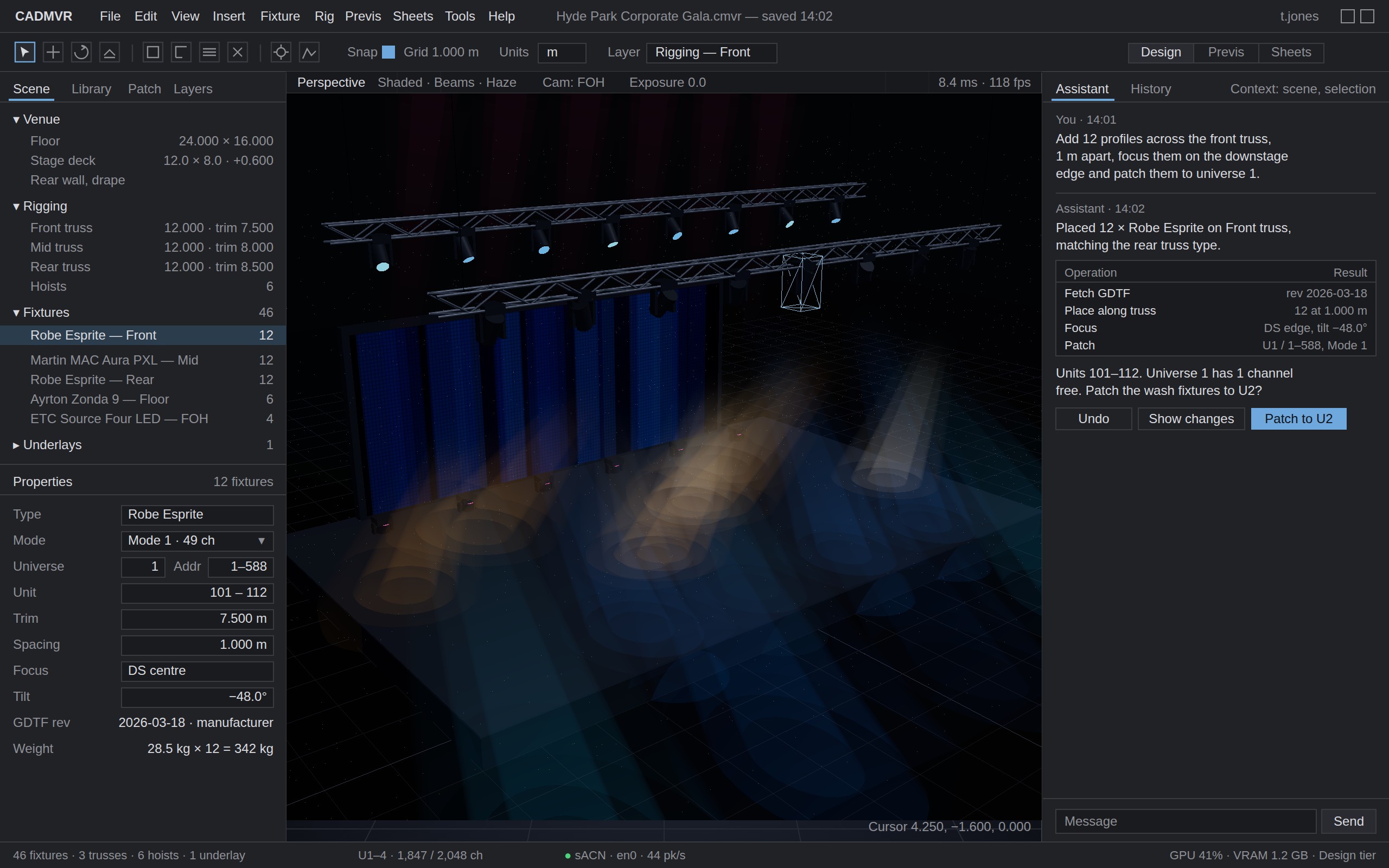
Dragging a fixture along the truss. Trim, spacing and focus are ordinary fields. - 03 · Output
Rough renders and plans, for free
A previs render, a plot with schedule and patch, and a clean MVR out.
The GDTF file carries the beam, the colour system and the gobo wheels, so the previs render comes from the fixture data rather than a stand-in. The plot, fixture schedule and patch list come from the same model. When the job is real, export a standard MVR and open it in Vectorworks, grandMA3, Depence or Capture as you built it.
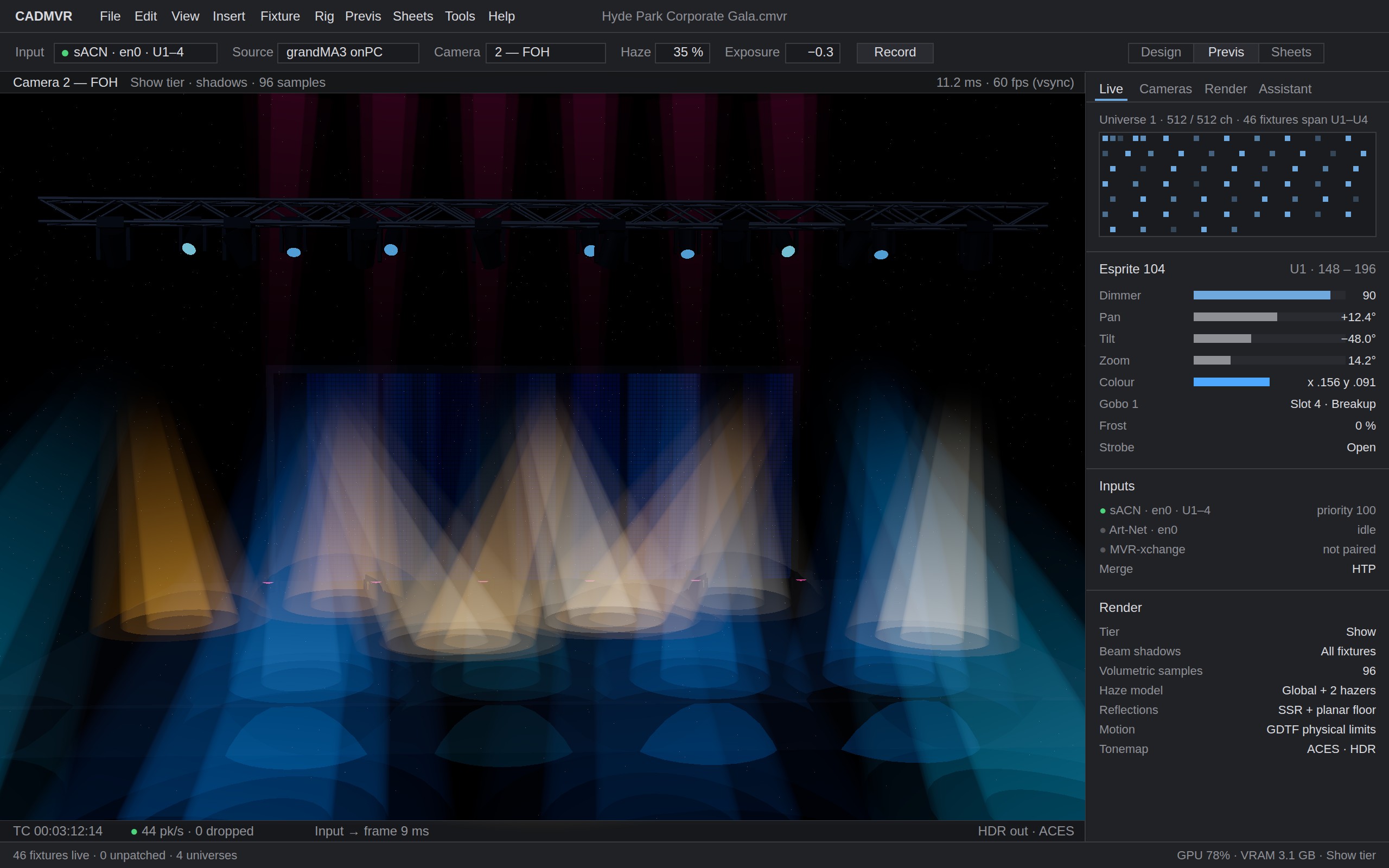
Previs, with beams, colour and gobos from each fixture file.
Alongside the tools you own
Vectorworks Spotlight
Theirs. The plot of record, Braceworks, ConnectCAD, the final drawing the venue signs off.
CADMVR. Arrive with a rig already built, patched and exported as MVR, so the proper drawing starts from something real.
Depence and Capture
Theirs. The photoreal show file: video walls, lasers, water, the render that goes to the client at the end.
CADMVR. Try ten looks before you build the show. Quick previs renders for the pitch, and a rig that arrives with real GDTF profiles rather than placeholders.
grandMA3, MagicQ and the desk
Theirs. Programming, and the visualiser that comes with the console.
CADMVR. Drive CADMVR live over sACN or Art-Net while you think, then hand the patch across as MVR. Nothing to relearn.
Who it is for
Touring and festival LD
Today. Vectorworks for the plot, Depence or Capture for the show, the desk for programming. Every idea has to be drawn properly before anyone can see it.
With CADMVR. Storm through the looks here first. Export the one that wins as MVR, with real fixture profiles, and carry on in the tools you already own.
Corporate AV designer
Today. A venue PDF arrives on Tuesday and the client wants to see something on Wednesday.
With CADMVR. Drop the PDF in, describe the rig, render a pitch and a quick plot the same afternoon. Draw the final in Vectorworks once the job is confirmed.
Production or technical manager
Today. Needs a fixture count, a patch and a drawing for the first advance, long before the design is final.
With CADMVR. A quick plot, schedule and patch list from the same model, good enough to start the conversation and easy to redo when it changes.
Rental house and prep tech
Today. Gets the designer's rig in whatever format the designer had, and checks it against the shelf by hand.
With CADMVR. Open any MVR. The fixture list is GDTF-accurate by construction, so what is on the plot is what goes in the truck.
Files and fixtures
Fixtures are read from GDTF with the official libMVRgdtf library, so geometry, DMX modes, wheels, colour and physical limits come from the manufacturer's data for any fixture on the GDTF Share, with no per-fixture code. The Share's catalogue is inside the app: sign in with your own account, search it locally, place the fixture, and the GDTF file travels with the project.
MVR is the interchange format. CADMVR reads and writes fixtures with every field, along with trusses, supports, scene objects, layers, classes and groups. Data it does not understand from another application is kept as it arrived and written back unchanged, so a file that passes through CADMVR on its way back to Vectorworks keeps what Vectorworks put there.
CADMVR's own file, .cmvr, is a zip containing a standard MVR 1.6 with the GDTF
files embedded, plus a small sidecar for the things MVR does not carry: sheets, view state
and the assistant's history. Rename it and the MVR inside opens in Vectorworks or grandMA3.
MVR and GDTF are open standards maintained by the GDTF group. CADMVR implements them and is not endorsed by that group.
What ships when
This is the plan as of September 2026. The first alpha is planned for 2027. The order can change as the alpha finds out what matters most.
| Area | Paid alpha | 1.0 | Later |
|---|---|---|---|
| Modelling | Stage decks, walls, floors, risers, extrude/move/rotate/scale/array/mirror, snapping, units mm/m/ft-in | Booleans, sweeps, curved truss, LED walls, projection screens, seating blocks, layers & classes | Parametric constraints, custom symbol authoring, weight and load calcs |
| Truss & hanging | Straight truss (parametric length, common profiles), hoists as points, hang-on-truss with auto-orientation | Corner blocks, circles, ground support, chain-hoist library, drop bars, pipe | Load distribution, bridle calcs |
| Fixtures | GDTF Share login, browse, download, cache; place; DMX mode; patch; unit numbers; addresses; focus | Multi-instance fixtures (bars, pixel devices), gobo/colour wheels rendered, fixture presets | Fixture builder link-out, custom GDTF editing |
| AI | Chat that builds/edits via tools; reads PDF plans; explains what it did | DWG understanding, focus-position suggestion, "make it like this photo" | Autonomous whole-show drafts, style memory per user |
| Rendering | PBR, forward+ clustered lights, volumetric beams, haze, gobos, TAA, bloom, GPU picking | Shadowed beams, LED video content, 4× supersampled stills, render-to-video | Reflections, GI, haze advection, path-traced stills, VR viewer |
| Previs | sACN & Art-Net in, per-fixture GDTF DMX decoding, pan/tilt physics, GDTF Share-accurate colour | MVR-xchange, timecode, multiple network interfaces, DMX out (send) | NDI/video input, laser support |
| Documents | 2D plot from the model, fixture schedule, patch list; PDF/SVG export | Title blocks, sheets, DXF/DWG export, section views, cable schedules | Rendered "hero" images in the plot |
| Interop | MVR import/export, GDTF, PDF underlay, glTF/OBJ import | DWG/DXF import & export (ODA), IFC read, SketchUp | Vectorworks direct sync via MVR-xchange |
What it runs on
- Operating system
- Windows 10 22H2 or Windows 11
- Graphics
- Any GPU with Vulkan 1.2 (DirectX 12 fallback). Dedicated GPU recommended.
- Memory
- 8 GB, 16 GB recommended
- Install
- Signed installer, direct download. No app store, no licence manager.
Register your interest.
One email when there is a build to try. Nothing else.